

Very few companies ever have problems with their staff being unaware of the work that needs to get done. The real issue lies in making sure this work gets done efficiently when there is more than one person, approval process, and deadline to consider. An item could remain in the inbox, the handover can fail to take place, or someone will find themselves spending time tracking progress instead of doing the work itself.
Workflow Management Software: Turning Business Processes Into Repeatable Work
Workflow management software enables companies to manage how work flows through various phases, individuals, and groups. Rather than relying on emails, spreadsheets, or other methods to ensure that a process flows as expected, companies can determine the requirements at each phase and the person accountable for it.
The benefits of using workflow management software become especially evident when it comes to recurring processes like onboarding employees, purchase approvals, client inquiries, payment processes, and reviews within an organization.
Where Business Work Gets Stuck
Process delays usually do not occur when employees lack knowledge of how to perform tasks. Delays usually occur between processes.
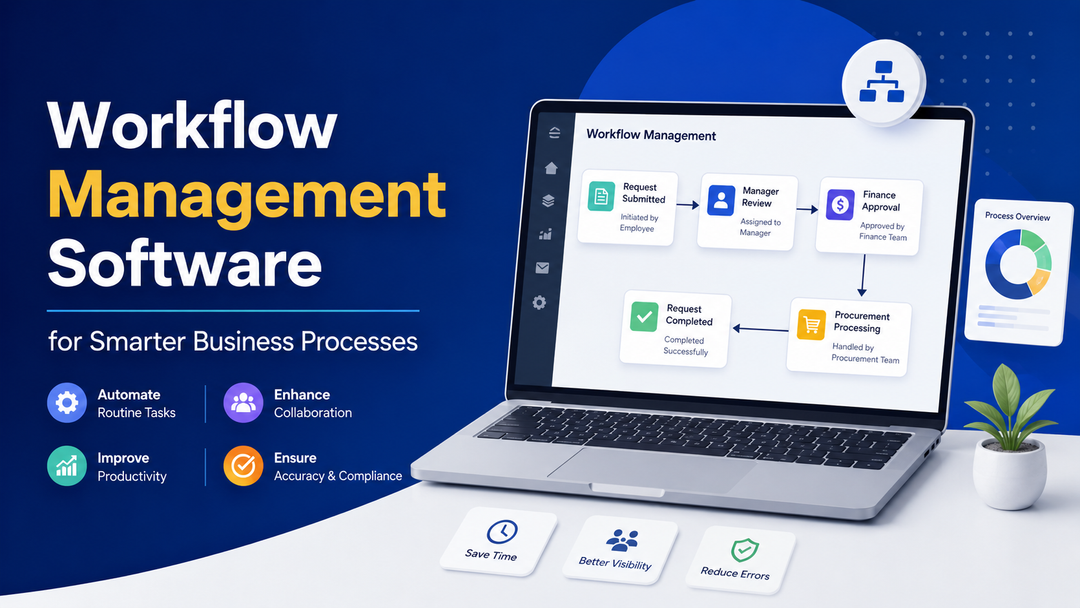
Take an example of a purchase requisition. The employee makes a requisition; it is evaluated by the manager, it undergoes budget check by finance, and finally it gets processed by procurement. What if it takes three days for the requisition to sit in someone’s inbox? Nobody would know whether it is pending, lacks something, or is undergoing processing.
The complexity increases when similar processes occur thousands of times.
- Some typical causes of friction are:
- Follow-up by people: Employees waste time checking whether things have been done or approved.
- Lack of clarity on ownership: It’s not clear who should do the next thing.
- Handover via emails: Significant requests get lost amidst other communications.
- Use of spreadsheets: The status needs to be manually updated and can get outdated fast.
- Re-keying of data: Data gets copied again and again from one place to another.
- Need for approval from someone: Things need approval from someone who is unaware of the pending task.
- Variance in process: Employees use different processes for the same activity.
A workflow system solves all these issues by laying out what should be done after each step.
For instance, there could be an employee who submits a purchase request, a manager reviews the request, the finance department gets the request after approval, and finally procurement processes the request. Every individual knows when their turn comes up and what needs to be done at that point. This process involves more than simply reducing clicks. Everyone is aware of the location of the work and what should be done next.
What Actually Happens Inside a Workflow?
Workflow is a set of rules that defines the way tasks move from one step to the other.
Some key components of a simple workflow include the following:
- Trigger: The trigger of a process; for example, a request.
- Assignment: This refers to the individual or group of people who perform the task.
- Action: It refers to the task to be performed.
- Condition: It is a rule that dictates the direction the process should take.
- Handoff: This is when the task is handed over to someone else.
- Completion: It means the task has been completed.
Think about an employee asking for new equipment.
The employee asks for the equipment. The request is forwarded automatically to the manager. The manager examines it and if the equipment that is requested goes beyond a particular level, there might be another approval needed. After approval, the request is forwarded to procurement which completes the request. The employee does not have to know who will deal with the request. The manager does not have to figure out who is the appropriate person to whom an approved request should be forwarded. Procurement does not have to search multiple inboxes for new requests.
All these transitions are defined beforehand in the workflow. More sophisticated workflows can also have alternate routes. For instance, a customer complaint can be forwarded to the support department in case the complaint is routine in nature but forwarded to a senior team if it is important as per predefined criteria.
It distinguishes workflow management from a simple checklist. It can react to occurrences within the process and not just record things people should do.
What Workflow Management Software Changes
The value becomes clearer when we take a look at how software transforms common manual processes.
Manual reminders become automated notifications.
The responsible individual can be automatically notified by the system instead of the task having to be remembered and chased for.
Email handoffs become workflow stages.
The next stage could be triggered automatically upon completion of the previous stage instead of sending a manual request.
Spreadsheet monitoring becomes monitoring of the process currently in progress.
This way, users know whether something is waiting, in progress, complete, or overdue without the need for keeping track of it manually.
Manual data input can become automated.
Data entered in the first stage can be moved to other stages automatically without the need for inputting it once again.
Unclear ownership becomes ownership.
A stage owner can be appointed explicitly. Rule-based escalation can be derived from manual escalation.
The system can remind the user if there is an untouch request for a specific period of time. Such alterations may look insignificant at first glance, but they turn out to be quite important, taking into consideration that the process is performed dozens or thousands of times.
For instance, if an HR department deals with hundreds of requests of employees per month, even minor alterations help save many hours spent on handling them manually. What is more, the employees have more time for other activities.
The Processes That Benefit Most From Workflow Management
Not every business process needs to be automated. The strongest candidates usually have repeatable steps, multiple participants, frequent handoffs, or clear approval requirements.
Approval-Based Processes
Workflows for approval processes are the obvious choice since the flow is normally quite predictable.
This includes such examples as:
- Leaves
- Expense reimbursement
- Purchase requests
- Content approvals
- Contract approvals
The process can just go through its various steps, sending the request to the right people and recording decisions made along the way without anyone needing to coordinate each step individually.
Repetitive Multi-Step Processes
- There are processes that occur regularly, where the coordination of each step is an extra effort.
- Employee onboarding is one such process.
After HR verifies a new employee, there may be tasks that are supposed to be done in IT, facility, finance, and the new employee's supervisor's department. This process does not have to maintain its own checklist and send reminders, it can generate the relevant tasks for all involved departments. The same can apply to customer onboarding, invoicing, recruitment, etc.
Processes With Frequent Handoffs
- It could be challenging to keep up with tasks as responsibility shifts from one team to another.
- Take a case where a task starts with a sales cycle and progresses into an implementation phase.
- There will come a point after sealing the deal that the customer data needs to be gathered, implementation owner identified, a kickoff arranged, and everything set up.
- If there is no process in place, the data might easily get lost in transit.
- A workflow defines how to pass the baton from one team to the next.
Time-Sensitive Processes
- Some processes get costlier or riskier by virtue of delays.
- There might be deadlines for customer escalations, contract renewals, service requests, and compliance-related activities.
- The workflow is capable of tracking deadlines and initiating alerts/escalations based on process delays.
Automation Isn't the Whole Point
The topic of automation tends to be the focus when considering the application of workflow management software, but automation in itself is not the aim.
For example, take a process that involves seven approvals for a simple task. Automation of such approvals will not make the process efficient. Rather, it will involve the same wasteful steps in an electronic environment.
Before deciding on automation of any process, businesses should ask themselves:
- Do all the steps need to be there?
- Are all the approvals necessary?
- Are the same things being reentered?
- Can the two steps be done simultaneously?
- Does every request need to follow the same process of approval?
- Where do requests get hung up?
- Whose job is it to clear up the hang-ups?
This is why workflow design comes before automation.
If the process is designed well, it will eliminate three steps and automate the wasteful parts of those four. This would give a much better result than simply automating the process as it was done manually. One more advantage is visibility. Without any use of automation tools, the presence of a workflow gives an opportunity to understand which processes are backed up. If there are 40 requests that are waiting for approval while everything else works fine, then the issue will be obvious. Further investigation is needed to understand what to do about it.
Workflow Management vs Task Management
Task management and workflow management are similar, but address separate issues.
A task is a unit of work to be done.
Such as:
Review the contract of the customer.
The workflow is the flow of that unit of work within a bigger process.
Such as:
Contract is received, allocated to legal, reviewed, returned back for modifications if necessary, approved, forwarded to the client, signed, and archived.
Task management can be used when a person wants to manage his/her or the whole team’s tasks.
Workflow management can be used when the work flows from one person to another, from one team to another, from one stage to another, and from one decision point to another.
Both are not mutually exclusive and may even complement each other. The workflow can generate tasks and manage their outcomes.
What to Look for Before Automating a Workflow
The selection of software must come after the identification of the process. First, map out the process as it works currently. Do not try to document your ideal process right away. Focus on what is happening now in terms of workarounds, delays, redundant actions, and manual intervention. Next, consider how well the software will handle the process reality.
Consider whether it will allow:
- Different process flows: Not all requests have to follow the same path.
- Assignment of accountability at each stage: Each person should be informed when it is his or her time to act.
- Setting up conditions and rules: Depending on what has been entered before, the next step might differ.
- Establishing approval points: An approval process should be part of the workflow, rather than an outside email exchange.
- Automating of actions: Notifications, assignments, reminders, and status updates are often automated actions.
- Visualization of bottlenecks: A good system should help to identify bottlenecks rather than marking all the tasks as completed.
- Flexibility: Processes change, so workflow systems should not become hard to adjust.
- Integration with other software: Integration with such software as CRM, HR, finance, or customer support systems can eliminate manual data entry.
Usability is as important as functionality. A process which demands that the workers have to go through an elaborate interface in order to perform a task easily may be more troublesome than helpful.
When Workflow Management Software Is Worth It
Not all tasks require workflow management software.
If there's just one person involved in a task done once every month, creating a workflow would be an excessive step.
There are other aspects that make it more relevant for a process:
- The process is recurring.
- More than one person participates.
- Tasks change hands.
- Approvals are needed.
- People chase after the status of work.
- Little visibility into the process.
- Tasks are often late.
- There is heavy use of spreadsheets and e-mails to keep track of the process.
- Information needs to be repeated.
- There are predictable delays in the process.
- One can use the following question as a test:
"How much more time and uncertainty is spent on managing this process than completing the task itself?" If it's true that more effort goes into coordinating the process than doing the actual work, it would be a good choice for the workflow automation. We need not automate every single business process. The purpose of automation is to help do important processes better.
Conclusion
The significance of workflow management software goes beyond its ability to automate. The primary importance is in the structuring of business processes. With everybody being aware of what should happen next, whose responsibility the process is, and at which stage the process is at the moment, there will be fewer chances for a request to get lost between people or teams. Those processes that are ideal candidates for workflow management are recurring processes with multiple steps, transitions, approvals, or deadlines.
If your team needs a simpler approach to managing tasks and processing work in specific stages, Taskity may be a helpful tool. The tools that Taskity provides include task management, Kanban boards, custom workflows, deadlines, and progress tracking. With all of this in place, you will be able to create a structured process and manage it with less effort.
FAQS
What is Workflow Management Software?
Workflow management software allows companies to organize how their work flows between different individuals, departments, and stages. The software may include responsibilities, approvals, conditions, deadlines, or automatic responses to make sure that each recurring process follows a particular course.
How Workflow Management Software Works?
It begins with an initiating event, for example, when a certain request or action has been done. Next comes assigning of tasks, setting up conditions, moving the process to a corresponding stage, and so on.
What can workflow management software help automate?
Examples include onboarding employees, approval, processing expenses, customer onboarding, recruitment, processing invoices, escalating support, and content approval. The best use cases are those that are repeatable, predictable, have multiple stages or handoffs, or repetitive manual tasks.
What is the difference between workflow management and task management?
Task management manages individual tasks, whereas workflow management manages the flow of work through the process. A task could be something like "Review invoice," whereas a workflow would encompass the entire process of receiving, reviewing, approving, and processing the invoice.
When should a company use workflow management software?
It can be helpful if the processes that happen periodically are shared among multiple people, involve approvals, transitions, deadlines, or frequent check-ins. In cases where employees frequently find themselves asking for updates and manually checking on where the task stands, then the process might be a good candidate.
Can workflow management software help cut down on manual work?
Yes, in cases where the proper tasks are automated. Notifications, assignments, reminders, status updates, approvals, and other repetitive tasks can usually be automated. But a business should improve its process before automating its processes.