

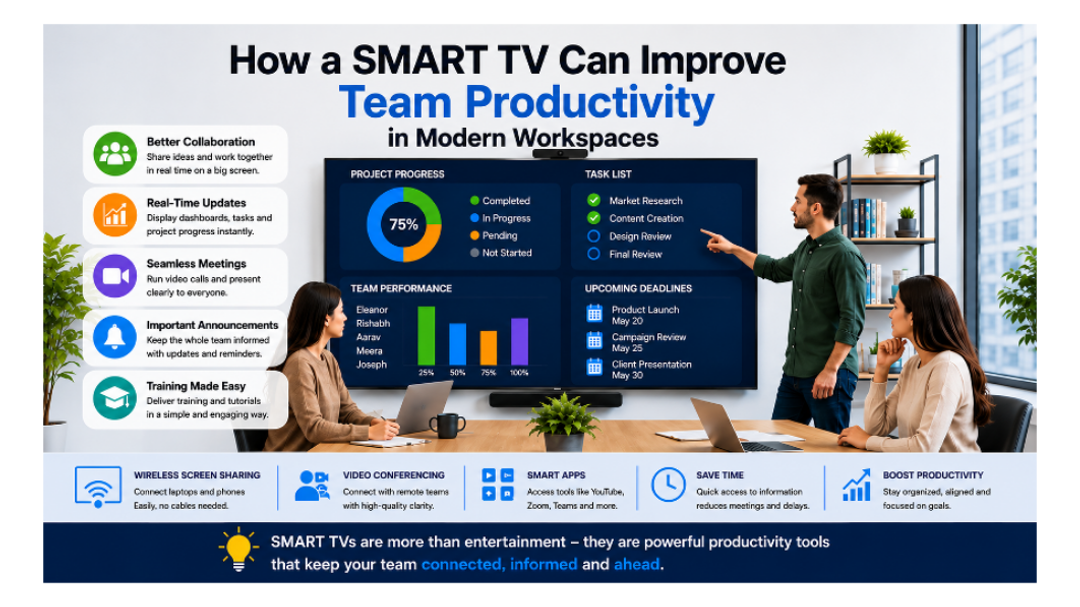
The dynamics of teamwork have been completely altered by technology. Years ago, many companies used boards, paper, and meetings for their projects. However, nowadays, companies are incorporating technology in an effort to improve their productivity and teamwork among members.
One such technological innovation is the SMART TV.
SMART TVs are regarded as entertainment devices by many. However, many companies are currently using the technology as a productivity tool.
For instance, teams can make video conferencing using the television and track their progress and present work done, discuss their ideas, and collaborate with others regarding their projects.
In conclusion, SMART TVs can ensure productivity and efficient communication at the workplace.
The purpose of this blog post is to explore ways through which SMART TVs increase productivity, why the technology is being adopted by firms in 2026, and how small teams can benefit from SMART TVs.
What Is a SMART TV?
SMART TV is an internet-enabled television.
Unlike regular televisions, SMART TVs can perform several functions, such as:
Web browsing
Using applications like YouTube and Zoom
Connection to laptops wirelessly
Showing presentations and dashboards
Screen-sharing when holding online meetings.
Therefore, you can think of SMART TVs as large computer screens that also have internet capability.
Imagine it to be a computer screen with internet capabilities.
SMART TVs have been put into use by businesses not only for entertainment purposes but also for professional purposes.
Why Modern Teams Need Better Communication
Imagine a workplace where:
Team members forget deadlines
Nobody knows project updates
Meetings take too long
Employees keep asking for status updates
Important announcements get missed
This creates confusion and slows work down.
Modern teams work faster when everyone can clearly see:
What tasks are happening
Which projects are delayed
Team goals
Upcoming deadlines
Important updates
This is where SMART TVs become useful.
They act like a central information screen for the whole team.
How SMART TVs Improve Team Productivity
Let’s look at the biggest ways SMART TVs help teams work smarter.
1. Displaying Team Dashboards in Real Time
Many businesses use tools like:
Trello
Asana
ClickUp
Monday.com
These tools track projects and tasks.
Instead of checking updates again and again on personal laptops, companies can display live dashboards on a SMART TV.
This helps everyone instantly see:
Completed tasks
Pending work
Team goals
Project progress
Why this improves productivity:
Teams stay updated
Less confusion
Fewer unnecessary meetings
Better accountability
When tasks are visible to everyone, people stay more focused.
2. Improving Team Meetings
Traditional meetings often waste time.
People struggle with:
Small laptop screens
Sharing files
Explaining data
Technical issues
SMART TVs solve many of these problems.
Teams can:
Present slides clearly
Share screens wirelessly
Show reports and charts
Explain ideas visually
Large screens make meetings easier to understand.
Example:
Instead of passing one laptop around the room, everyone can see the presentation clearly on a big screen.
This makes meetings:
Faster
More interactive
Easier to follow
3. Helping Remote and Hybrid Teams
In 2026, many businesses have remote workers.
Some employees work from home while others work in the office.
SMART TVs help hybrid teams stay connected through:
Video calls
Zoom meetings
Microsoft Teams
Google Meet
A SMART TV creates a better meeting experience because everyone can see remote members more clearly.
Benefits:
Better communication
Stronger teamwork
More natural discussions
Easier collaboration
Remote employees feel more included when communication is smooth.
4. Showing Important Company Updates
Sometimes employees miss important messages buried inside emails or chats.
SMART TVs can display:
Company announcements
Upcoming deadlines
Team achievements
Daily schedules
Motivational messages
This keeps everyone informed without constantly sending reminders.
Why this matters:
Clear communication reduces mistakes and confusion.
5. Encouraging Better Collaboration
Visual communication helps people understand things faster.
For example:
Brainstorming ideas
Reviewing designs
Planning campaigns
Organizing workflows
All become easier on a large screen.
Teams can stand together, discuss ideas, and make decisions quickly.
This creates:
Better teamwork
Faster planning
Improved creativity
6. Making Training Easier
SMART TVs are also useful for employee training.
Businesses can use them to:
Show tutorials
Train new employees
Display learning videos
Explain workflows
Instead of gathering around one computer, the entire team can learn together comfortably.
Why it helps:
Training becomes:
More professional
Easier to understand
More engaging
7. Saving Time Every Day
Small delays waste a lot of time in offices.
For example:
Repeating instructions
Searching for updates
Setting up projectors
Explaining tasks repeatedly
SMART TVs simplify these activities.
Teams can instantly access information without extra effort.
Even saving a few minutes daily can make a huge difference over time.
SMART TVs vs Traditional Projectors
SMART TVs are becoming more popular than traditional projectors in modern offices because they are easier to use and provide better picture quality. Unlike projectors, SMART TVs work well even in bright rooms and do not need complicated setup or extra cables. Teams can quickly share screens, display task dashboards, and run video meetings smoothly. Projectors are still useful for very large conference rooms, but they often need maintenance and darker spaces to work properly. For most businesses, SMART TVs are a simpler and more productive option that helps teams communicate and collaborate more efficiently every day.
Features Businesses Should Look for in a SMART TV
Not every SMART TV is perfect for workspaces.
Here are some important features businesses should consider:
1. Screen Size
Larger teams need larger screens.
For meeting rooms, businesses often use:
55-inch
65-inch
75-inch TVs
2. Wireless Screen Sharing
This allows employees to connect laptops without cables.
It saves time and reduces setup problems.
3. Good Resolution
4K screens provide clearer text and presentations.
This is important for charts, documents, and dashboards.
4. App Support
The TV should support apps like:
Zoom
Microsoft Teams
Google Meet
YouTube
5. Fast Performance
A slow TV creates frustration.
Businesses should choose TVs with smooth performance.
Best Ways Businesses Use SMART TVs in 2026
Modern companies are becoming creative with SMART TVs.
Here are some popular uses:
Task Management Screens
Digital Notice Boards
Meeting Room Displays
Performance Tracking
Creative Brainstorming
Industries That Benefit Most
SMART TVs are useful in many industries.
1. Startups
Small businesses use SMART TVs for:
Planning
Collaboration
Team communication
2. Marketing Agencies
Marketing teams display:
Campaign dashboards
Analytics
Creative presentations
3. Schools and Training Centers
SMART TVs improve:
Teaching
Online learning
Student presentations
4. Corporate Offices
Large businesses use them for:
Video meetings
Performance tracking
Team updates
Common Mistakes Businesses Make
Even good technology becomes useless if not used properly.
Here are common mistakes:
Buying Very Cheap TVs
Using TVs Only for Meetings
Poor Placement
Too Much Information on Screen
SMART TV Trends in 2026
SMART TVs are becoming smarter every year.
Here are some major trends:
AI Integration
Better Video Conferencing
Wireless Workspaces
Interactive Displays
How Small Teams Can Benefit Too
Many people think SMART TVs are only for large companies.
That’s not true.
Even small teams can benefit because SMART TVs:
Improve communication
Reduce confusion
Save time
Make collaboration easier
A small startup with 5 people can still become more organized using one central display screen.
Final Thoughts
Modern workplaces are changing quickly.
Teams no longer want slow communication, confusing workflows, or endless meetings.
SMART TVs help businesses:
Stay organized
Improve collaboration
Share information easily
Manage projects better
Save time
They are no longer just entertainment devices.
In 2026, SMART TVs have become useful productivity tools for modern teams and businesses.
The best part is that they are simple to use.
Even small teams can improve communication and teamwork by using SMART TVs the right way.
At the end of the day, productivity is not only about working harder. It’s about using smarter tools that help teams stay connected, focused, and efficient.
FAQs
1. What is a SMART TV used for in offices?
SMART TVs are used for meetings, presentations, video calls, dashboards, and team collaboration in modern workplaces.
2. How do SMART TVs improve team productivity?
They improve productivity by making communication faster, displaying real-time updates, and helping teams collaborate more efficiently.
3. Can small businesses use SMART TVs?
Yes. Even small teams can use SMART TVs to improve communication, task management, and teamwork.
4. Which apps can businesses use on SMART TVs?
Businesses commonly use Zoom, Google Meet, Microsoft Teams, YouTube, Trello, and Asana on SMART TVs.
5. Are SMART TVs better than projectors for offices?
In many cases, yes. SMART TVs offer better picture quality, easier setup, and smoother wireless connectivity.
6. What size SMART TV is best for meeting rooms?
55-inch TVs work well for small rooms, while 65-inch and 75-inch screens are better for medium and large meeting rooms.
7. What features should businesses look for in a SMART TV?
Businesses should look for 4K resolution, wireless screen sharing, app support, fast performance, and a large display.
8. Can SMART TVs help remote teams?
Yes. SMART TVs improve video meetings and help remote employees communicate and collaborate more effectively.